 Null
NullDownload
Install once with the full client, then use the updater to stay current. No website account needed, you create one in the client on first login.
Updater (existing installs)
Already have the game installed? Download the launcher, unzip it next to Maplestory Null.exe (or Browse to that folder), then click Play. It checks your files and downloads only what changed.
Full install (first time)
.exe. You need the matching .bin in the same folder, with the filenames unchanged.
Hosted on Google Drive. Total download is about ~18 GB. Google may show a virus-scan page and ask you to click Download anyway once, that is normal for large files.
Last updated: July 29, 2026, Version: v0.12a, Installer: Inno Setup, Updater: NullLauncher
How to install
-
Download both files
Download MaplestoryNull-Setup-0.12a.exe and MaplestoryNull-Setup-0.12a-1.bin above. You need both. If Google asks, click Download anyway.
-
Keep both files together
Make sure the
.exeand.binare in the same folder (Downloads is fine). Do not rename them. -
Run the setup as administrator
Right-click MaplestoryNull-Setup-0.12a.exe and choose Run as administrator. If setup was not run as administrator, the optional Launch checkbox at the end may show an error, that is cosmetic only. The game still installed; start it manually from the Start menu or install folder. A fix is coming soon.
Trouble? Windows protected your PC
Windows SmartScreen often blocks our installer because it is not commercially code-signed, normal for Maple private-server clients. If you downloaded from this page:
- Click More info
- Click Run anyway
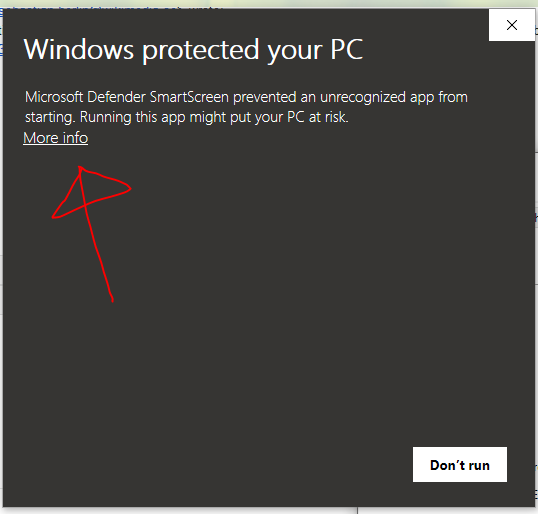
1. Click More info 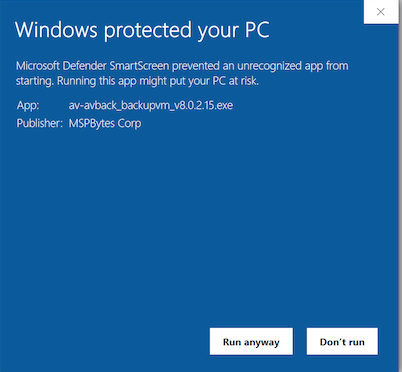
2. Click Run anyway -
Optional: install the updater
Download NullLauncher-v0.12a.zip, unzip it, and put the
NullLauncherfolder next to your game exe (or run it and Browse to the install folder). Use Play next time so client files stay updated without re-downloading the full 18 GB installer. -
First time running the game
Launch via NullLauncher (or the Null.Team client). On the login screen, type any username and password you want, if that username does not exist yet, the server creates the account for you automatically. There is nothing to register on the website. Use the same username and password next time. Then make a character, pick a channel, and play. Stuck? Ask in Discord.
No website login required. Download, install, then log in with a new username and password in the client to auto-create your account.